
Amoredate Login & Sign Up Guide: How to Register, Access Your Account, and Stay Safe
Starting something new online always raises questions — how does registration work, what does the platform do with personal data, and how easy is it to get back into the account later? For anyone considering the Amoredate website, these are fair things to wonder about. This is a dating platform built around calm, thoughtful interaction — a space where people can show up as they are, exchange ideas openly, and let things develop at their own pace. But before any of that can begin, there’s one practical step to take care of: creating an account and learning how to navigate Amoredate sign in, sign out, and everything in between.
Jump into a wolrd of new connections
This guide walks through the full process — from Amoredate sign-up to logging in on the web, recovering a forgotten password, understanding what security measures are in place, and even how to delete an Amoredate account if the time comes. Whether someone is taking their first step on the platform or returning after a break, this guide covers it all.
How to Create an Amoredate Account
The Amoredate sign-up process is designed to be straightforward. No lengthy forms, no confusing steps — just a few minutes to get started. Here is how to create an Amoredate account from scratch:

Visit the website on any web browser and navigate to the registration page.

Fill in the sign-up form with basic personal details: name, date of birth, gender, and email address.

Create a secure password that will be used for future Amoredate sign-in attempts.
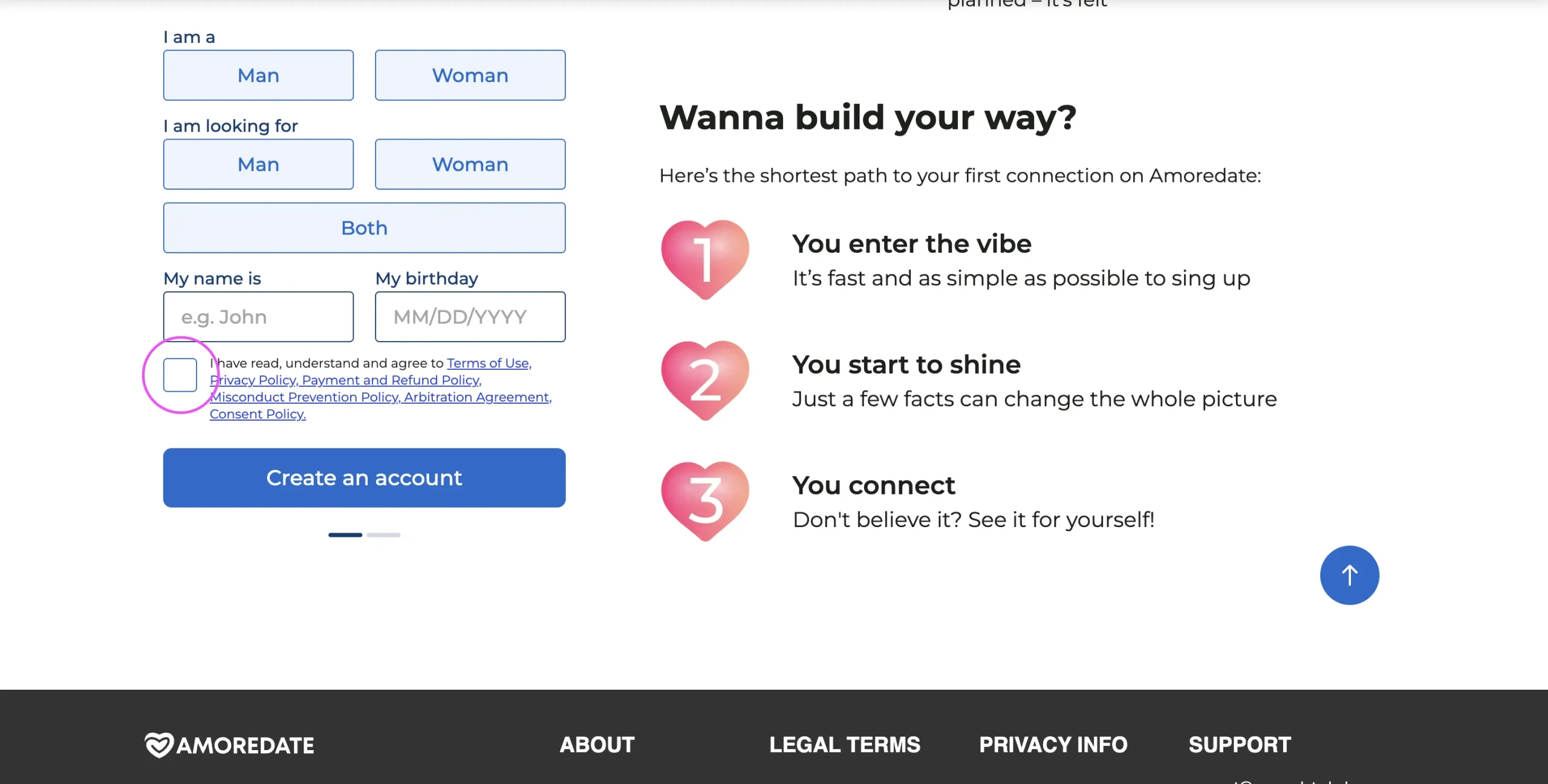
Accept the Terms of Use and submit the registration form.

Check the inbox for a verification email and click the confirmation link to activate the account.
Once confirmed, the Amoredate new account is ready. From this point, users can begin filling out their profile — uploading photos, writing a personal description, and setting preferences that help the platform surface relevant profiles.
Tips for Setting Up a Strong Profile
A complete, thoughtful profile makes a real difference on a platform like Amoredate. Here are a few things worth doing right away:
- Upload clear, recent photos that represent who you are.
- Write a bio that reflects your personality, interests, and what you are looking for in a connection.
- Fill in age and other preference fields to make use of the platform’s search filters.
- Return regularly to update the profile as interests evolve.
A well-built profile signals presence — and on Amoredate, presence matters more than performance.
Jump into a wolrd of new connections
How to Log In to Amoredate
Once a new account has been created, accessing it in the future is quick. Here is how the Amoredate sign-in process works:
- Open a web browser and go to the Amoredate website.
- Click the “Login” button, which is typically found in the upper-right corner of the homepage.
- Enter the registered email address and password used during sign-up.
- Click “Log In” to access the account and all available features.
That’s all it takes. The Amoredate web login process is the same regardless of which device is being used — desktop, tablet, or smartphone.
Amoredate Login Free vs. Premium Access
Discover Online Dating Made Simple — Amoredate
Amoredate brings a fresh approach to online dating, helping you connect with new people in a welcoming and comfortable environment.

One of the first things new users want to know is whether logging in costs anything. The answer is no — Amoredate login free access is available to everyone. Signing up and accessing basic features on the site does not require any payment.
However, some features go beyond the free tier. Premium options such as private messaging, stickers, and enhanced communication tools require credits, which can be purchased securely via credit card, Apple Pay, or Google Pay. The platform complies with PCI DSS standards, meaning all financial transactions meet industry-level security requirements.
For those wondering about the difference in the login experience: it is the same for free and premium users. Credits are simply purchased within the platform after logging in.
Logging In on Mobile or Desktop
Amoredate does not currently offer a dedicated mobile app to download. There is no app available for mobile devices at this time. However, the website is fully responsive and works smoothly across devices. Whether accessing via a desktop browser or a mobile browser on a smartphone, the Amoredate web login experience remains consistent and user-friendly. The site adapts to screen size automatically, so no features are lost on smaller screens.
Troubleshooting Login Issues
Forgetting a password happens to everyone. Resetting it on Amoredate is a simple process:
- Go to the Amoredate login page and click “Forgot Your Password.”
- Enter the email address associated with the account.
- Check the inbox for a 6-digit verification code — this code is time-sensitive, so use it promptly.
- Enter the code into the on-site form and click “Submit.”
- Follow the prompts to create a new password and log back in.
If the verification email does not appear, check the spam or junk folder before requesting a new one.
Other Common Login Problems and Solutions
Beyond the Amoredate login forgot password scenario, a few other issues sometimes come up:
- Incorrect credentials: Double-check that the email and password are entered correctly, with no extra spaces or capitalization errors.
- Browser issues: Clear the browser cache and cookies, then try again. An outdated browser can sometimes interfere with the login page loading properly.
- Unstable connection: Make sure the internet connection is stable before attempting to log in again.
- Account not yet verified: If the confirmation email was never clicked, the account may still be inactive. Check the inbox for the original verification link.
If none of these solutions work, the customer support team is available to help and generally resolves issues within five days.
Tips for Keeping Your Account Secure
Even with the platform’s built-in protections in place, good habits on the user’s end make a real difference. Here are some practical steps to stay safe:
- Use a strong password. A good password includes at least eight characters, a mix of uppercase and lowercase letters, and at least one number. Avoid using easily guessed information like birthdays or names.
- Never share login credentials. The email and password used for Amoredate sign in should remain private. Sharing access — even with someone trusted — creates unnecessary risk.
- Watch for phishing attempts. Always check that the website URL is the official Amoredate address before entering login details. Fake pages can look convincing, so this check is worth building into the habit.
- Log out on shared devices. If accessing the platform from a public or shared computer, always sign out when finished and avoid saving the password in the browser.
- Report suspicious behavior. If another user seems to be behaving in a way that feels off — asking for personal details early, making unusual requests — use the platform’s reporting tools. This helps keep the community good for everyone.
How to Delete an Amoredate Account
There may come a time when a user wants to take a break or leave the platform altogether. Amoredate offers two options:
Temporary Deactivation:
- Go to the account’s profile settings.
- Select the option to deactivate the account.
- The profile will become inactive and invisible to other users, but no data is lost.
Permanent Deletion:
- To delete Amoredate account data permanently, contact the customer support team directly.
- The support team will guide the process and confirm when the account and all associated data have been fully removed.
It is worth noting that knowing how to delete an Amoredate account means understanding what that decision involves: once a permanent deletion is complete, all messages, profile information, and account history are gone and cannot be recovered. Taking a moment to consider temporary deactivation first is often a wise step.
Connect With Amoredate on Social Media
Conclusion
Getting started on Amoredate is a simple process — a few minutes to complete sign up, a straightforward Amoredate web login, and a platform designed to make the experience feel comfortable from the very first step. What sets the platform apart is not just how easy it is to access, but the care that has gone into making it a safe and supportive space.
Visit the Amoredate website today to complete registration and take the first step.
welcome offer